
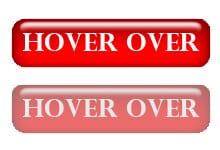
 Fade a button like a pro with this simple tutorial.
Recently working on a site I removed a image shadow that looked horrible with the site. I was a little stumped on what I should do to make the button apparent that it was a clickable image.
So I started searching around and came across a great little piece of code that is super stylish and very unobtrusive. With literally 5 lines of code we you can turn a boring button into something with style, but still looking professional.
When you hover over a button do you want it to underline the link nahh… We want something that grabs attention so we fade it, but the trick is controlling the fade in-out speed! Take a look at the code:
a img {
opacity: 1;
transition: opacity .85s ease-in-out;
-moz-transition: opacity .85s ease-in-out;
-webkit-transition: opacity .85s ease-in-out;
}
a img:hover{
opacity: .50;
}
How does it work?
What I start with is an image that has a link associated with it making it a button. The “a img” first defines the amount of opacity here:
opacity: 1;
Next we have this lovely piece of code:
transition: opacity .85s ease-in-out;
-moz-transition: opacity .85s ease-in-out;
-webkit-transition: opacity .85s ease-in-out;
This is where the button goes from boring to beautiful and CSS3 gets to shine. The transition: opacity .**s ease-in-out; is what controls your fade speed. The lower the number the faster the fade, the higher the number the slower the fade, so .85 is nearly a full second for the fade to finish. In my sites that I use this I usually set the **s to .25s this looks just about perfect, for the demo I set it high to really show off the power of this simple code.
It fades now what?
Now we have a choice to make, how much do we want it to fade? Using this:
a img:hover{ <—- Activates upon the mouse hovering over the button
opacity: .50; }
Just by simply changing opacity: .50; to opacity: .25; your button will go from a very noticeable fade to a slight and professional looking button fade.
That’s it! Thats all the code that is needed to make a boring button stay professional but have a great style.